> ## Documentation Index
> Fetch the complete documentation index at: https://docs.classform.net/llms.txt
> Use this file to discover all available pages before exploring further.
# 취소 및 환불
> 신청 취소 및 환불을 요청하는 방법을 안내합니다.
## 신청 취소
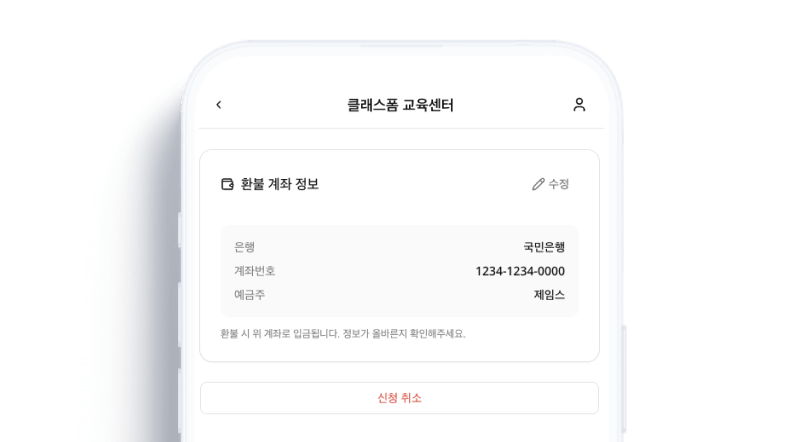 마이페이지에서 취소할 신청 건을 선택하고 **취소하기**를 클릭하면 신청이 취소됩니다.
입금 전 상태에서는 즉시 취소됩니다.
***
## 환불 요청
마이페이지에서 취소할 신청 건을 선택하고 **취소하기**를 클릭하면 신청이 취소됩니다.
입금 전 상태에서는 즉시 취소됩니다.
***
## 환불 요청
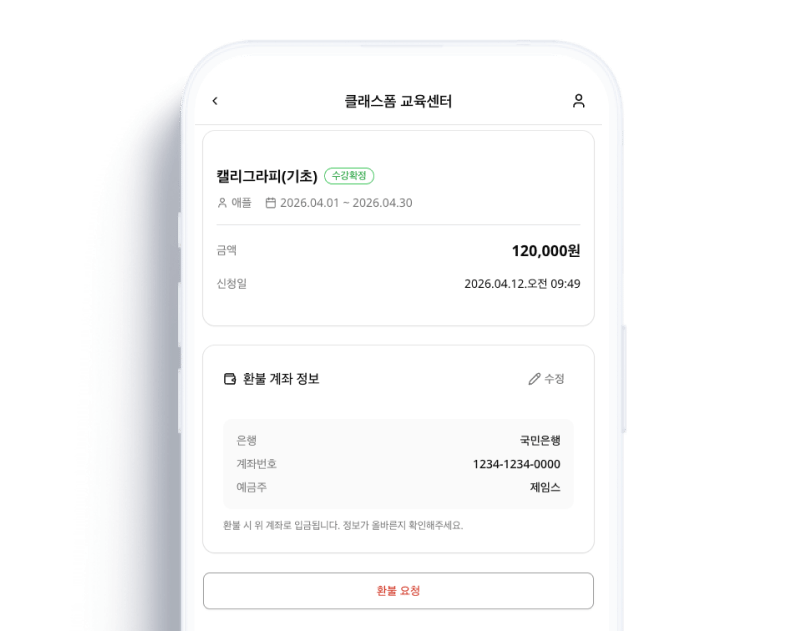 이미 입금이 완료된 건은 **환불 요청**을 클릭하면 센터 관리자에게 환불 요청이 전달됩니다.
환불은 센터의 환불 규정에 따라 처리됩니다. 환불 진행 상태는 마이페이지에서 확인할 수 있습니다.
환불 요청 후 센터 관리자가 전체 환불, 부분 환불, 거절 중 하나를 선택하여 처리합니다. 실제 환불 금액의 이체는 센터에서 직접 진행합니다.
이미 입금이 완료된 건은 **환불 요청**을 클릭하면 센터 관리자에게 환불 요청이 전달됩니다.
환불은 센터의 환불 규정에 따라 처리됩니다. 환불 진행 상태는 마이페이지에서 확인할 수 있습니다.
환불 요청 후 센터 관리자가 전체 환불, 부분 환불, 거절 중 하나를 선택하여 처리합니다. 실제 환불 금액의 이체는 센터에서 직접 진행합니다.